Theme Compatibility
MegaForm can either keep its own designed template styling or inherit the host page theme. This is useful on Oqtane sites that use Bootswatch themes: premium forms can stay brand-locked when you want a polished campaign page, or they can blend into the page when the site theme should control font and color.
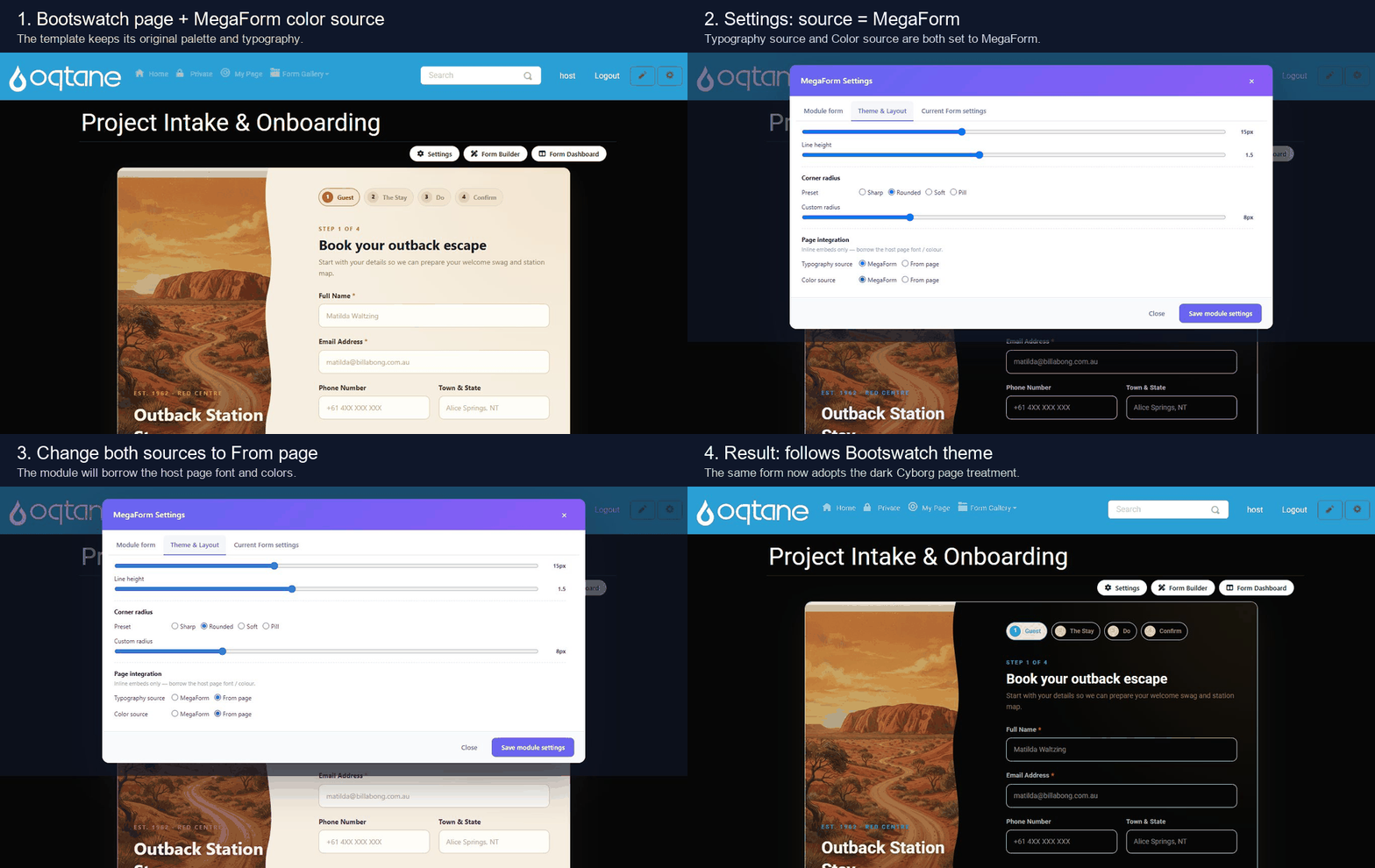
Two styling modes
Use MegaForm as the source when the template should keep its original color palette, typography, spacing, and custom shell. In the capture above, the page is already running a Bootswatch theme, but the Outback template initially keeps its own warm illustrated design.
Use From page when the form should borrow the host page's font and colors. After switching both Typography source and Color source to From page, the same module follows the Bootswatch page treatment.
How to switch
- Open the form page in Oqtane as an administrator.
- Click Settings on the MegaForm module.
- Open Theme & Layout.
- Under Page integration, choose the source for Typography source and Color source.
- Click Save module settings.
The settings are module-aware: a form can keep MegaForm styling on one page and inherit the Oqtane / Bootswatch theme on another page.